


Inkpad Notepad & To do list
4.552.07K Reviews
App Specs
- Version
- Varies with Device
- Updated On
- License
- Free
- Downloads
- 10,000,000+
- Developer
- Workpail
- Categories
- Productivity
- Platform
- Android
Screenshots
 Analysis by AppCompare
Ever had one of those moments where you need to jot something down quickly, but you’re fumbling through your phone trying to find the right app? Enter Inkpad Notepad & To do list. This nifty little app is here to save the day, and trust me, it’s got a lot going for it.
Getting Started with Inkpad Notepad
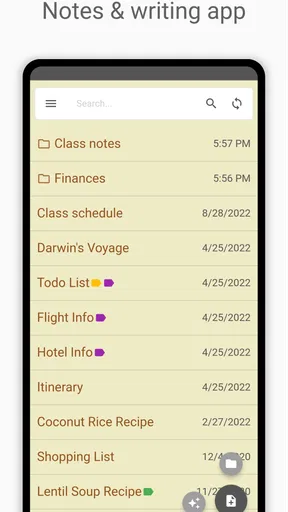
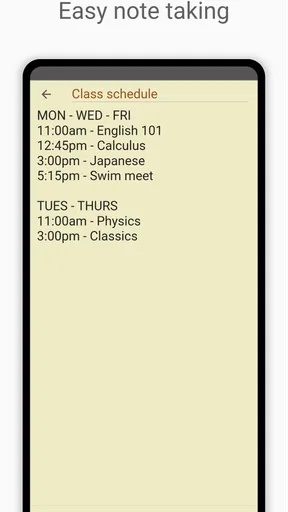
First things first, getting started with Inkpad Notepad & To do list is as easy as pie. Once you download it, you’re greeted with a clean and user-friendly interface. There's no clutter, just a straightforward way to create notes and lists. I found this refreshing because, let's be honest, some apps try to do too much and end up being more confusing than helpful.
Whether you’re an Android aficionado or an iOS enthusiast, the app runs smoothly on both platforms. It feels like it was designed with simplicity and efficiency in mind, which is exactly what you want from a note-taking app.
Features That Stand Out
Now, let’s dive into some of the features that make this app a keeper. One of my favorites is the automatic saving feature. Gone are the days of losing your thoughts because you forgot to hit ‘save’. Inkpad does it for you, which is a huge relief when you’re juggling a million things at once.
Another standout feature is the ability to sync your notes across devices. So, whether you’re on your phone, tablet, or computer, your notes are just a tap away. I can’t tell you how many times this has saved me when I needed to access my grocery list while at the store or review a to-do list on the go.
And let’s not forget about customization. You can personalize your notes with different fonts and colors, making it not only functional but also pleasant to use. Plus, who doesn’t love a bit of personalization to spice up their day-to-day tasks?
Using Inkpad for Productivity
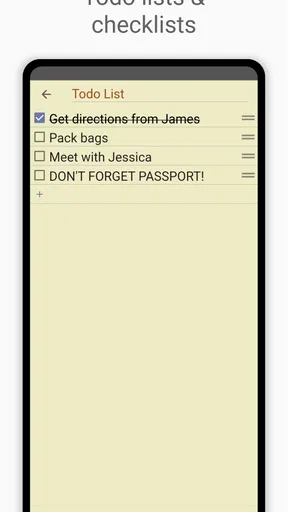
Alright, let’s talk productivity. If you’re someone who loves keeping things organized, this app is your new best friend. The to-do list feature is a game-changer. You can create multiple lists, categorize your tasks, and check them off as you go. It’s incredibly satisfying to see your list shrink as you power through your day.
Worth Reading Before You Choose

EA SPORTS FC Mobile 26 Is a Bigger Football Game, but It Takes Time

Flipboard Shows What News Apps Must Do Beyond the Feed

Switching to Android Auto Means Rethinking Your Driving Routine

Google Calendar Makes a Crowded Week Easier to Manage

Ludo King Makes the Most of the Minutes Between Plans

Baby Panda World Brings Quick Play to Modern Phones, but Its Game Library Feels Busy
I also appreciate the reminder feature. Set a reminder for a note or task, and Inkpad will give you a nudge when it’s time to take action. This is perfect for those of us who tend to forget things (guilty as charged).
Why Inkpad Stands Out
So, why choose Inkpad over the myriad of other note-taking apps out there? For starters, it’s free. Yes, there are premium features, but the free version is robust enough to meet most users’ needs. It’s also ad-free, which means no annoying pop-ups interrupting your workflow.
Another reason is its simplicity. It doesn’t try to be anything other than a reliable note and list app. Sometimes, less is more, and Inkpad nails that mantra. It’s become a staple on my phone for its ease of use and reliable performance.
Final Thoughts
At the end of the day, Inkpad Notepad & To do list is a solid choice for anyone looking to streamline their note-taking and task management. It’s not overloaded with unnecessary features, but rather focuses on what’s important: helping you stay organized and efficient.
Whether you’re a student, a busy professional, or just someone who loves a good list, this app has something for you. Give it a try, and you might just find it’s the missing piece in your productivity puzzle. Now, go on and conquer that to-do list!
Pros
- Simple and intuitive user interface.
- Syncs seamlessly across multiple devices.
- Offers offline access to notes.
- Supports rich text formatting tools.
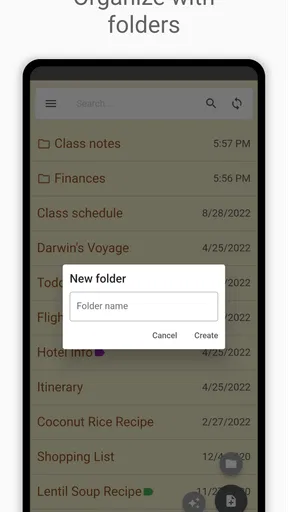
- Allows easy organization with folders.
Cons
- Limited export options for notes.
- No option for password protection.
- Ads can be intrusive in free version.
- Lacks advanced collaboration features.
- Customization options are minimal.
FAQs for Inkpad Notepad & To do list
What features does Inkpad Notepad & To-do List offer?
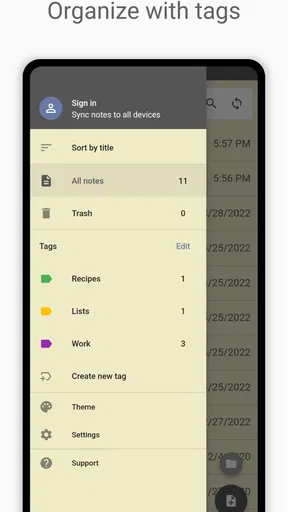
Inkpad Notepad & To-do List provides a simple, intuitive interface for creating notes and to-do lists. Key features include cloud syncing, checklist creation, and password protection for sensitive notes. The app also supports voice-to-text input, making it easy to jot down ideas quickly while on the go. Users can customize their experience with themes and organize notes using tags.
Is Inkpad Notepad & To-do List available for both Android and iOS?
Yes, Inkpad Notepad & To-do List is available for both Android and iOS platforms. This ensures that users have a seamless experience across different devices, allowing them to access their notes and lists from any smartphone or tablet. The app also offers a web version, so you can view and edit your notes directly from a browser.
Does Inkpad Notepad & To-do List require an internet connection to use?
Inkpad Notepad & To-do List can be used offline, allowing you to create and edit notes without an internet connection. However, to sync your notes across devices or to the cloud, an internet connection is necessary. This feature is especially useful for ensuring your data is backed up and accessible from multiple devices.
Is there a cost associated with using Inkpad Notepad & To-do List?
Inkpad Notepad & To-do List offers a free version with basic features, which is sufficient for most users. However, there is also a premium subscription available that unlocks additional features such as ad-free usage, advanced search capabilities, and more storage space for notes. The premium version is ideal for users who need more robust functionality.
How secure is my data with Inkpad Notepad & To-do List?
The app provides several security measures to protect your data. Notes can be password-protected, adding an extra layer of security for sensitive information. Additionally, your data is encrypted during cloud sync to prevent unauthorized access. These features ensure that your notes and lists remain private and secure.


